 SnapSong
If you want a gift that is personal, emotional and affordable at the same time, a song made for the person is hard to beat as a gift idea. Flowers wilt, gift cards feel generic, and most objects say more about the store than about the two of you. A song that carries their name, a shared memory and a mood chosen for them says something no object can: I stopped and thought about you. And unlike most meaningful gifts, it does not need weeks of planning or a big budget.
Gifting a custom song used to come with two obstacles: price and time. Professional custom-song services hire a real songwriter to write, sing and produce a track about your person. The results can be lovely, but they charge accordingly and delivery usually takes days, because a human being writes, records and mixes every track.
The newer alternative is a personalized song gift generated from photos. You pick a picture of the person (or of a moment you shared), add their name and the occasion, and an original AI song with lyrics, melody and vocals arrives in minutes. It is free to try, so you can hear the result before deciding it is gift-worthy.
Both options are legitimate; they fit different moments. A wedding, where one song may soundtrack the first dance forever, can deserve a human songwriter and the price that comes with it. A birthday, an anniversary, a farewell gift for a coworker, or a no-reason surprise on a Tuesday fits the fast option: a song born from a photo of them.
How to do it with SnapSong
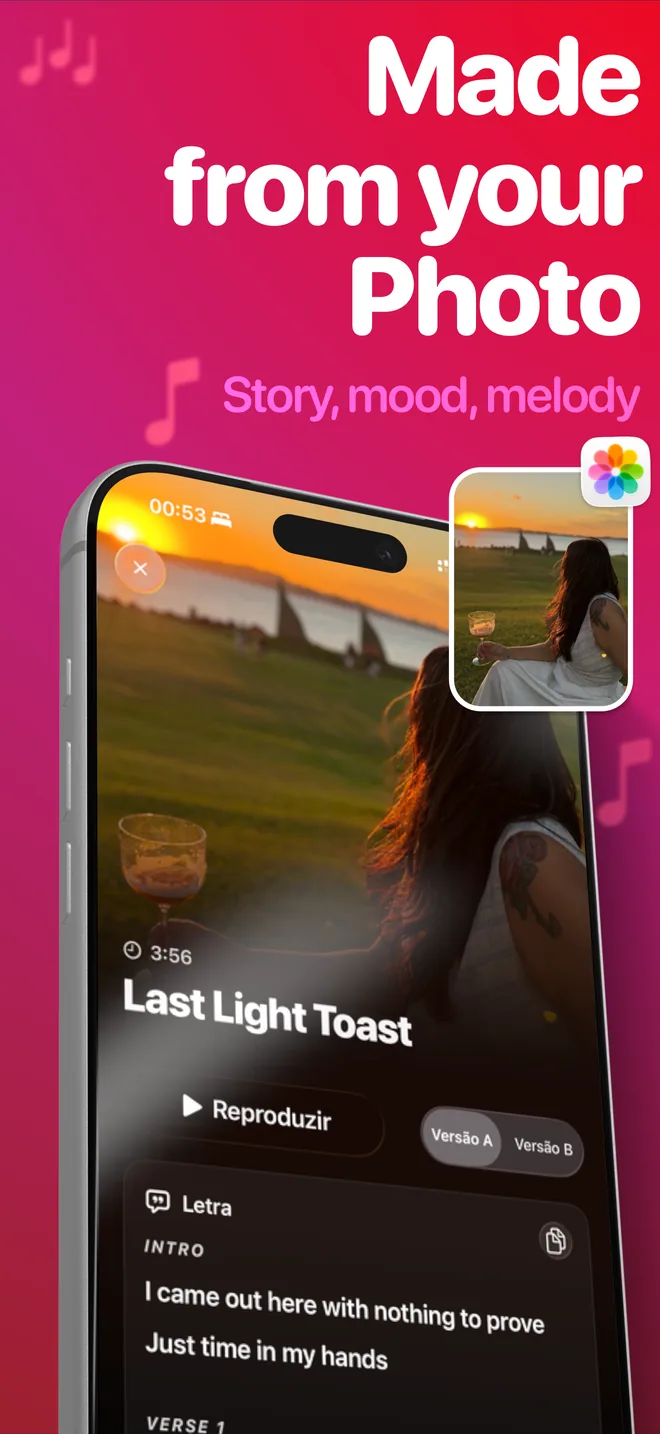
SnapSong is an iPhone app that turns any photo into an original song. Here is the gift version of the flow:
- Choose the photo that holds a memory. A shared memory beats a posed portrait: the two of you laughing at that dinner, the trip where it rained all week, the kitchen where you always end up talking. SnapSong reads the colors, people, place and mood of the image, so a photo with a story gives the lyrics something real to sing about.
- Open SnapSong and pick the photo from your library, or snap a new one with the camera. Choosing a photo is the only required step.
- Add keywords: their name and the occasion. Something like "Laura, ten years together" or "Dad, retirement" points the AI at the person and the moment. A feeling or an inside joke works too.
- Pick a music style. There are more than 50 to choose from: acoustic for something tender, pop for a celebration, rap for a laugh.
- Wait 2 to 5 minutes. You can follow the progress in real time on the Lock Screen and Dynamic Island while you wrap the rest of the gift.
- Listen before you gift it. Read the full lyrics, make sure the song lands the way you want, then save it or share it through the iOS share sheet.
Ideas for delivering the song
The delivery is half the gift. A few ways that work well:
- Send the song together with the original photo. They hear the track and see the exact picture it was born from. The pair tells the whole story.
- Play it in person. At the birthday table, just before the toast, or at the end of the dinner. Watching the reaction live is the best part.
- Close a farewell with it. For someone moving to a new city or a new job, send the song as your last message before they go.
What to expect, honestly
Generating a song needs an internet connection, and results vary with the photo: a clear moment with people, a place and a mood gives the AI more to work with than a dark or blurry shot. If the first version is not quite right, try different keywords or another photo; the photo drives the song. SnapSong is free to download and try, and SnapSong Pro, a subscription, unlocks more song creation, full song playback, downloads, faster generation and two AI versions per photo. Lyrics come out in English, Portuguese, Spanish, French or German, auto-detected from your device language, so the gift sings in the language you both share. Photos and songs stay stored locally on your device, and no account is needed.
The next gift-worthy photo is probably already in your library.

 AI Music Maker: SnapSong, free on the App Store